Thursday, April 14, 2011
Redsnow Jailbreak iOS 4.3.2 Is Available | Tethered 4.3.2 Jailbreak

Jailbreak iOS 4.3.2 With Pwnage Tool [ How To - Guide ]
iOS 4.3.2 was just released by Apple a couple of hours ago, and a working jailbreak was already released. You can jailbreak iPhone 4 on 4.3.2 using Pwnage Tool and the appropriate iPhone 4 bundles. However, this is a tethered jailbreak and you can only jailbreak iPhone 4 on 4.3.2 at this time, butsupport for iPhone 3GS and iPod Touch 3G, 4G will be released soon. Pwnage Tool is for Mac users only, but Windows support will be out soon.

For those of you who don’t know, when performing a tethered jailbreak you have to boot your iPhone 4 into a jailbroken state every time you reboot it.
Also, unlockers must stay away from 4.3.2 at this time, because Ultrasnow wasn’t yet updated tosupport the new firmware version so if you jailbreak your iPhone 4 on 4.3.2 with Pwnage Tool you will preserve your baseband, but it will be useless.
This is not the official version of Pwnage Tool for 4.3.2, you will be modifying the latest Pwnage Tool 4.3 to work with iOS 4.3.2. Stay tuned so we can inform you when the official version is out!
Download Links:- Download Pwnage Tool 4.3 for Mac
- Download Pwnage Tool bundles for iPhone 4 firmware 4.3.2 here
- Download iOS 4.3.2
- Download tetheredboot
Download IOS 4.3.2 for iPhone, iPad and iPod Touch | Direct Download Link

Direct Download Links for IOS 4.3.2/ 4.2.7:
Ultrasnow 1.2.1 – How To Unlock iOS 4.3.1 | iPhone 4 & iPhone 3GS
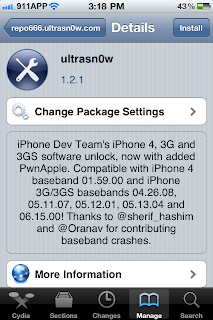
The iPhone Dev Team have just updated Ultrasnow to work with iOS 4.3.1 and fix the signal bars issues and any other issues that you have encountered. Ultrasnow 1.2.1 Unlock for 4.3.1 still doesn’t unlock the newer basebands, it’s just an update that allows the already compatible iPhone devices to work with 4.3.1.
Remember, in order to unlock your device with Ultrasnow 1.2.1 for 4.3.1 you must update your iPhone4, 3GS to iOS 4.3.1 with Snowbreeze 2.5.1 or PwnageTool 4.3 that will preserve your old baseband.

Ultrasnow 1.2.1 unlock for 4.3.1 works on iPhone 4, iPhone 3GS and iPhone 3G with the following basebands:
- 01.59.00
- 04.26.08
- 05.11.07
- 05.12.01
- 05.13.04
- 06.15.00
However, there is an alternative solution to unlock iPhone 3GS & iPhone 3G that have the newer basebands, by upgrading their baseband to 06.15.00.
Follow the steps below to unlock your iPhone 4, 3GS, 3G with Ultrasnow 1.2.1 unlock for 4.3.1.
- Tap on Cydia
- Tap on Manage
- Tap on Sources
- Tap Edit and then Add. When the window pop’s out enter “http://repo666.ultrasn0w.com” and then tap on Add Source
- Wait for Cydia to complete a series of automated steps and then search for “Ultrasnow 1.2.1” and install it.
- Restart your iPhone 4 or iPhone 3GS and you’re done!
You have successfully managed to unlock your iPhone 4, 3GS, 3G with Ultrasnow 1.2.1 for 4.3.1. If you have any of the newer basebands you still have to wait for Ultrasnow to get another update, and hope that Dev Team figures out a way to do it.